Import CSV File as Alternate Depreciation
To import the CSV file as an alternate depreciation:
-
Go to Setup > Import/Export > Import CSV Records.
-
In the Import Assistant - Scan & Upload CSV File screen, do the following:
-
From the Import Type list, select Custom Records.
-
From the Record Type list, select FAM Alternate Depreciation.
-
Select your CSV file, and then click Next.
-
-
In the Import Assistant - Import Options screen, set Data Handling to Add or Update, and then click Next.
-
In the Import Assistant - Field Mapping screen, do the following:
-
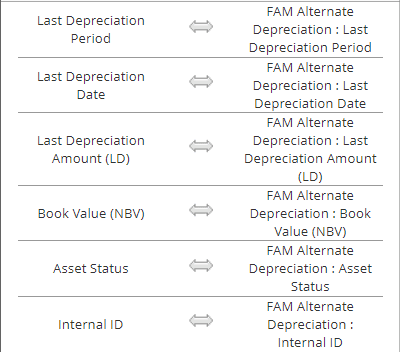
Map the fields in your CSV file to NetSuite fields as follows:
-
Click Next.
To set default values and reference types on fields, see Setting Default Values and Reference Types.
-
-
In the Import Assistant - Save Mapping and Start Import screen, do the following:
-
Enter an Import Map Name and Description.
-
Click Save & Run.
-