Process Status Page
To view the status of a process, go to the Process Status page (Fixed Assets > Background Processing > Status).
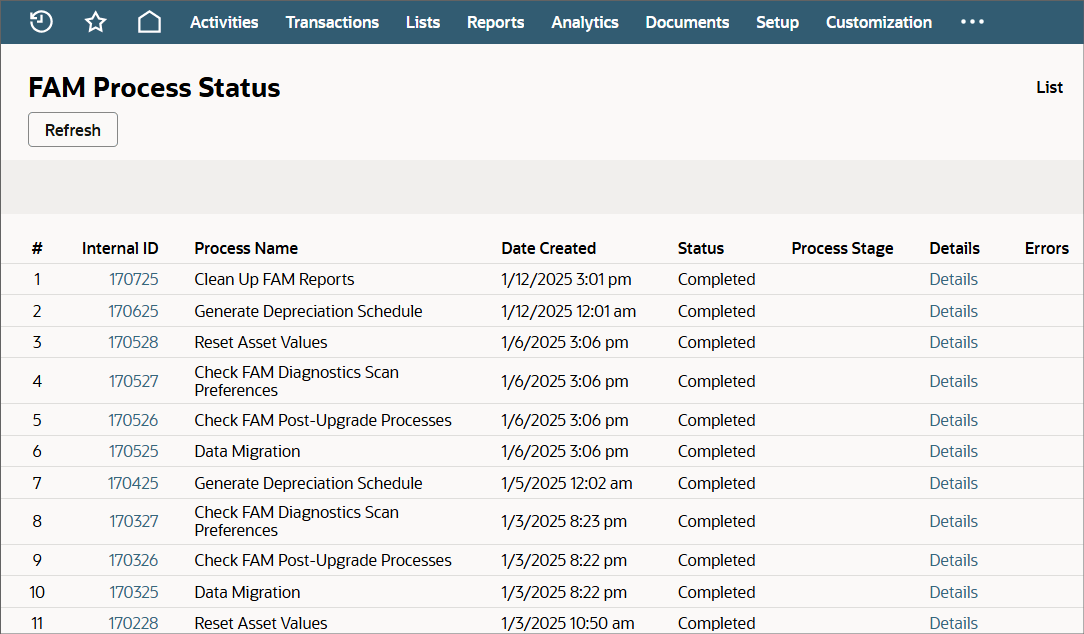
The process status page displays the 20 most recent processes.
The following table describes each column on the Process Status page:
|
Column |
Description |
|---|---|
|
Internal ID |
Click the internal ID to open the FAM process record, and view more details about the selected process. |
|
Process Name |
Identifies the process that was triggered. |
|
Date Created |
Shows the date when the process was triggered. |
|
Status |
Shows the current status of the process:
|
|
Process Stage |
Shows the process stage that's currently running. The process stage is visible only when the process is currently running. |
|
Details |
Click the Details link to view details about the specific stages in the process. For more information, see Process Stage Details. |
|
Errors |
Processes with a status of Failed or Completed with Errors are highlighted in red. You can click the Error link to view details. |