Planning for Custom Transaction Type Links
When you create a link to a custom transaction type, first you should consider the center that will host the link. A center is a view of NetSuite. Each role is linked to one center only. The center determines which tabs and menus display when a user logs in to NetSuite with the associated role. Before you begin creating links, you should identify which roles need to access the transaction type, and the centers that are associated with these roles. For more information about centers, see Centers Overview.
For each link you create, you specify a section, category, and label. The following illustration shows how each of these elements appears in the UI.
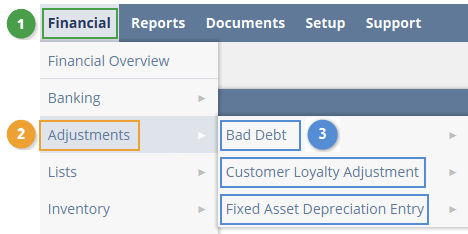
In the preceding illustration, the highlighted areas are defined as follows:
-
1 - A section. Sections are sometimes called tabs.
-
2 - A category
-
3 - Labels
When creating links, you can use standard NetSuite centers, sections, and categories, or you can create your own.
Before members of a role can use links to a transaction type, the role must also have permission to view or use the transaction type. For details on granting these permissions, see Permissions for Custom Transaction Instances.