Viewing Plug-in Implementation System Notes
You can view the activity of your plug-in implementation on the System Notes subtab of the Plug-in Implementations page.
To view plug-in implementation system notes:
-
Go to Customization > Plug-ins > Plug-in Implementations. Click Edit beside the implementation that you want to view.
-
Click the System Notes subtab.
Note:Previously, plug-in implementation information was listed on the History subtab, but that subtab is no longer updated. New plug-in implementation activity is shown on the System Notes subtab.
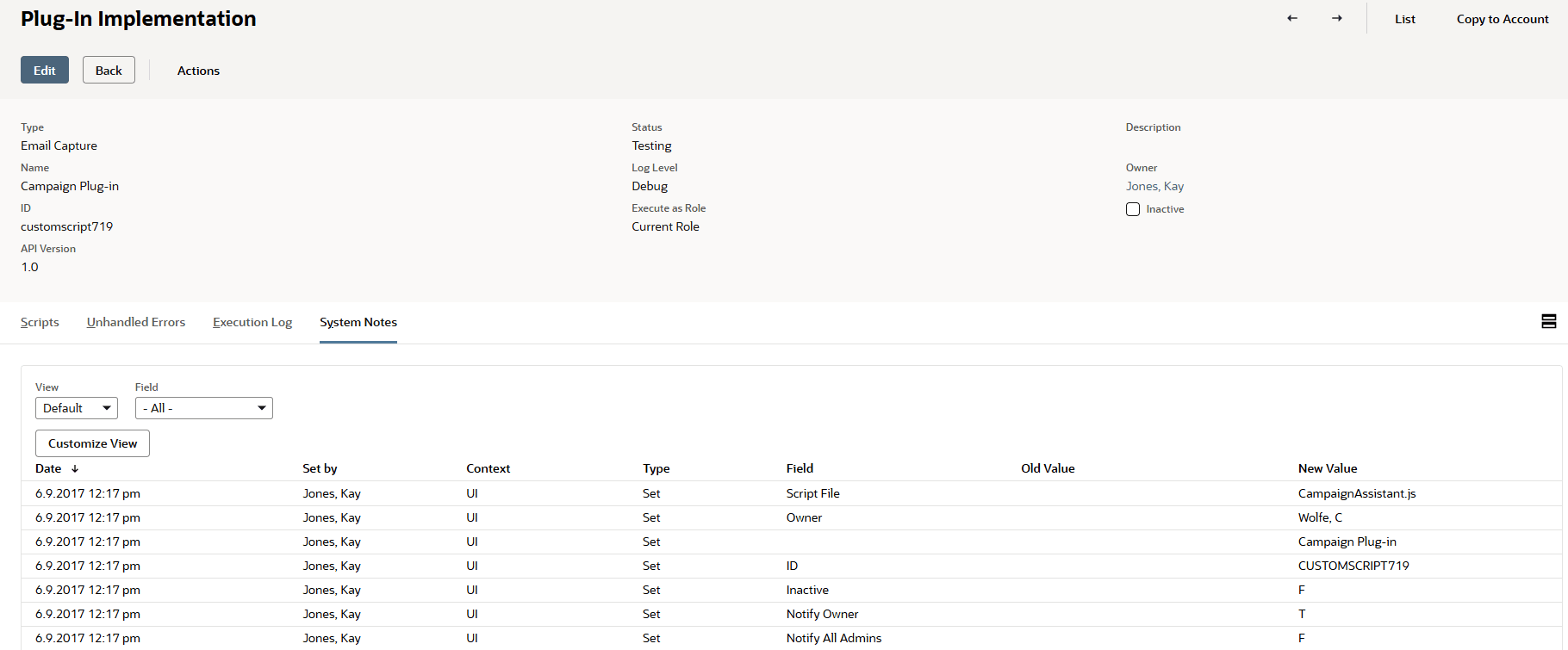
System notes for changes to a plug-in implementation record capture the following information:
-
Date when the change was made
-
Who made the change
-
Context for the change (for example, UI)
-
Type of change, for example, Edit
-
Field changed
-
Old value
-
New value
-
Role of the user who made the change (included as of 2017.2 - you have to customize the view to see the Role column)
For more information about system notes, see System Notes Overview
NetSuite always uses the current version of the Custom GL Lines Plug-in. An older version of the plug-in may have been used to create a transaction, and may have generated a different result than the current version. If you try to update a transaction in a closed period, and the current version of the plug-in generates a different result, you can't save y updates.
You can either open the period, or branch your plug-in implementation based on the plug-in version date.