Subsidiary Context
Available for most reports in accounts using NetSuite OneWorld.
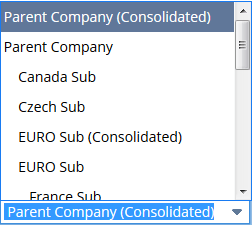
If you use NetSuite OneWorld, pick the subsidiary data you want to show on the report. If a report can show consolidated info, the Subsidiary Context field in the report footer includes options labeled (Consolidated).
Selecting a subsidiary context on a report causes the following:
-
The report is filtered to show only data from the subsidiary you pick, or for consolidated subsidiaries, to show data for all child subsidiaries of the consolidated parent.
-
Currency amounts appear in the base currency of the chosen subsidiary. Consolidated rates are used if the subsidiaries on the report have different base currencies. For more information, see Consolidated Reporting in OneWorld.
-
If you're viewing a financial statement, the layout associated with the selected subsidiary is used. For more information, see Subsidiary-Specific Financial Layouts.
If your view is restricted to a subsidiary, the Subsidiary Context field is only visible for financial reports. For more information, see Subsidiary Context for Reports. For more information about views restricted by subsidiary, see Restrict Your Subsidiary View.
For financial statements in accounts using NetSuite OneWorld, you can group, sort, and filter data by subsidiary. For information, see Organizing Financial Statement Data by Subsidiary.