SuiteCloud Processors Priority Elevation
Priority elevation lets you to automatically raise the priority of each low or standard priority job after a specific amount of time. The time interval starts when the job is submitted. You usually don't need to use these settings so priority elevation is disabled by default. However, you may need to use them if lower priority jobs experience excessive wait times.
Priority elevation only affects lower priority jobs with a wait time greater than the time interval indicated. If a lower priority job is sent to the processor pool before the time interval ends, it is processed with its original priority.
To access the priority elevation settings, go to Setup > Preferences > SuiteCloud Processors.
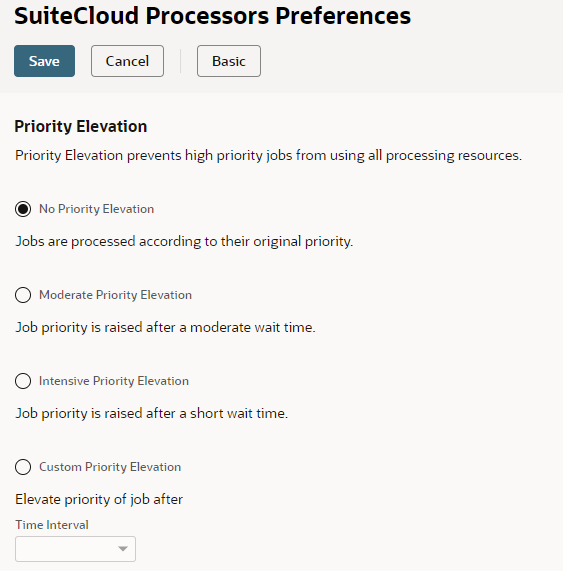
There are three settings:
-
No Priority Elevation: The default setting.
-
Moderate Priority Elevation:
-
If a low priority job is still waiting after four hours, it's elevated to standard priority.
-
If a standard priority job is still waiting after four hours, it's elevated to high priority.
With this option, if priority elevation applies, the system elevates low priority jobs to high priority jobs after eight hours. Specifically, these jobs are elevated to standard priority after four hours and to high priority after another four hours.
-
-
Intensive Priority Elevation:
-
If a low priority job is still waiting after one hour, it's elevated to standard priority.
-
If a standard priority job is still waiting after one hour, it's elevated to high priority.
With this option, if priority elevation applies, the system elevates low priority jobs to high priority jobs after two hours. Specifically, these jobs are elevated to standard priority after one hour and to high priority after another hour.
-
-
Custom Priority Elevation: This option lets you to specify a custom time interval for priority elevation using the Time Interval field.
The Time Interval field shows the time interval set for priority elevation. When you select Custom Priority Elevation, you can edit the field. Otherwise, the field shows a value that corresponds to the option selected, but you can't edit it..
Click Advanced at the top of the page to access Custom Priority Elevation and Time Interval.