Administrative Notification Setup
NetSuite uses administrative notifications, displayed when you log in, to give you important information about changes to your account, like infrastructure maintenance, service upgrades, or any major changes that could affect your business. You can specify which users receive administrative notifications and which notifications are pending or confirmed.
It's important to specify the appropriate recipients for these notifications so you can plan for maintenance events. Some examples include:
-
NetSuite Administrators and IT personnel should be aware of changes to the service.
-
Accounting or Billing department heads need to see billing or renewal notices.
-
Legal department heads need to see legal notifications.
-
Operations decision makers need to see scheduled maintenance notifications that may affect access to your account.
By default, all administrative notifications are presented to every user with the Administrator role, and each user must acknowledge the notification to access the NetSuite account.
You can enter settings for each of the following notification types to make sure they're going to the right recipients:
-
Administrative Notifications: Announce upcoming changes to feature availability in your account.
-
Billing and Renewal Notices: Alert you to payment requirements when you purchase new features and notify you when it's time to renew your contract with Oracle.
-
Legal Notifications: Notify you of changes that require administrator acceptance, such as a modification to the Terms of Service (TOS).
-
Scheduled Maintenance: Provide the date and time when scheduled maintenance tasks may affect access to your account.
-
Service Release Notifications: Announce the upcoming release of a new version of NetSuite. These notifications provide information about access to the Release Preview account, and when your account will be upgraded.
To set up administrative notification recipients. go to Setup > Company > Company Management > Administrative Notifications. Add users you want to receive the notifications and see who confirmed them and when.
The Administrative Notifications page is available to users with the Administrator role or the Setup Company permission.
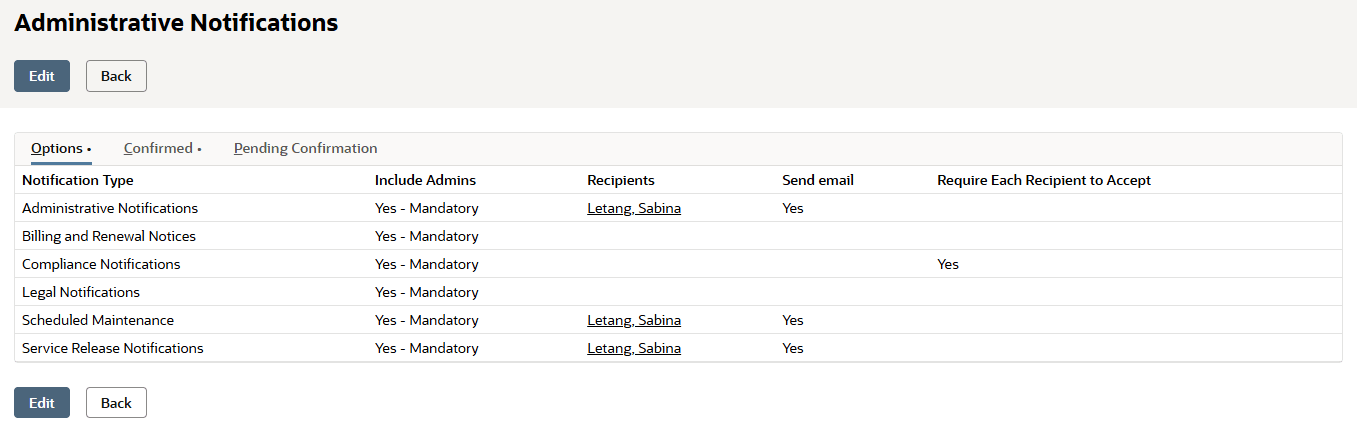
On the Options subtab, you can:
-
Designate multiple users, in addition to administrators, as notification recipients.
Important:You may be able to add users that don't have NetSuite login access as notification recipients, but they won't get notification email messages.
-
You can choose to send notifications by email as well as show notifications in NetSuite.
-
For more information, see Setting Administrative Notification Options.
On the Confirmed subtab, you can see:
-
When a recipient confirmed they read a notification.
-
Who confirmed they read the notification.
For more information, see Review Notification Confirmations.
On the Pending Confirmation subtab, you can see:
-
Which notifications haven't been confirmed yet.
-
Who hasn't confirmed they read the notification.
For more information, see Review Pending Confirmations.