SuiteScript
This release note was updated March 16, 2026.
Refer to the following sections for details on SuiteScript updates for NetSuite 2026.1:
Custom Tool Script Enhancements
NetSuite 2026.1 introduces the following enhancements to custom tool scripts:
Custom Tool Script and SDF Object Updates
The custom tool script type and its corresponding SuiteCloud Development Framework (SDF) object have been updated. With these changes, you can now view execution logs for custom tool scripts on the Script Execution Logs page by going to Customization > Scripting > Script Execution Logs.
To use this logging feature, update your existing custom tool scripts and their corresponding SDF objects, and ensure that new and updated custom tool implementations include the following updates:
-
For custom tool scripts:
-
Add the JSDoc tag
@NScriptType CustomTool. -
Declare entry point functions for tool methods as asynchronous.
-
-
For SDF object XML definition files associated with custom tool scripts:
-
Change the SDF object name from
tooltotoolset. -
Update the
scriptidprefix fromcustomtool_tocusttoolset_. -
Rename the attribute
exposeto3rdpartyagentstoexposetoaiconnector.
-
Applying these updates gives you improved script monitoring and troubleshooting capabilities with access to execution logs. For guidance on updating your custom tools, see How to Update Custom Tool Scripts for Execution Log Support in NetSuite 2026.1 (SuiteAnswers ID: 1024036).
For more information, see the following help topics:
-
SDF Custom Object XML Definition: toolset
You can also see the updated sample SuiteCloud project in the MCP-Sample-Tools directory of the SuiteCloud Project Repository on Oracle Samples GitHub.
New Custom Tools Page
In NetSuite, custom tool scripts let you define one or more tools, which are individual functions that perform specific actions and can be invoked by external AI clients through the NetSuite AI Connector Service.
The new Custom Tools page provides a centralized location to view and manage the tools available in your NetSuite account. This page displays tools from SuiteApps and account customization projects (ACPs), organized by toolset, which is the SDF object used to define custom tool scripts and group related tools.
To access the Custom Tools page, go to Customization > Scripting > Custom Tools.
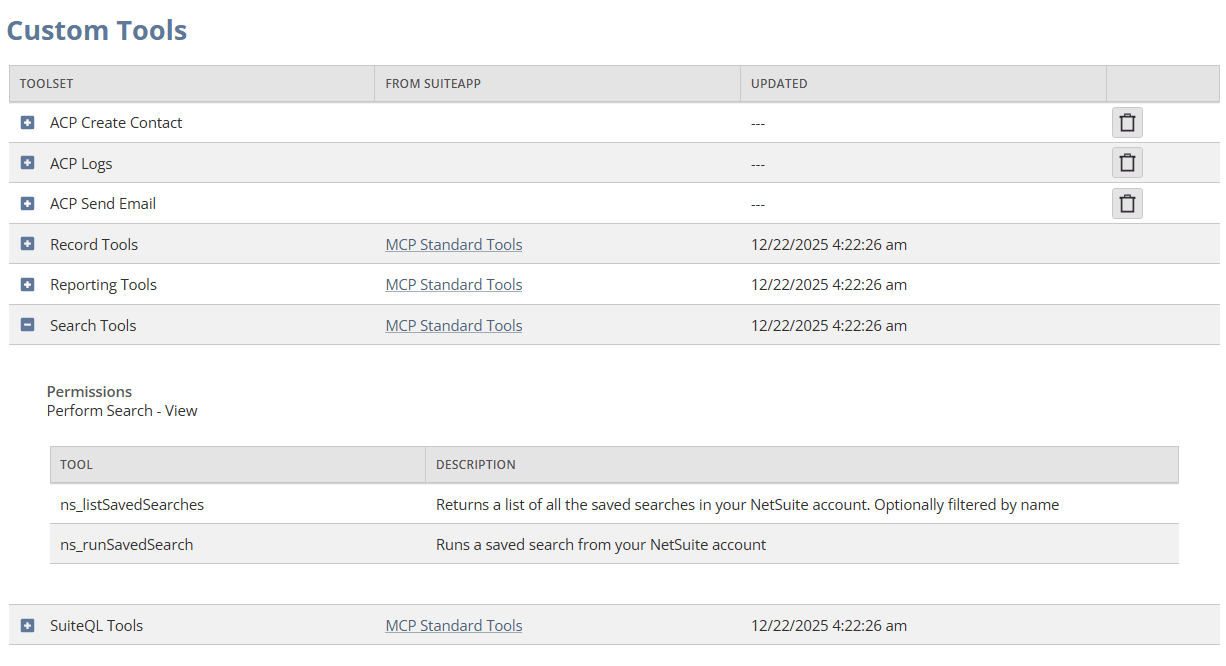
When you expand a toolset, you can see individual tools and the permissions required to access them in the AI client. You can delete ACP toolsets directly from the Custom Tools page. You can't delete SuiteApp toolsets from this page, but you can use the SuiteApp link to go to the Installed SuiteApps page and remove the SuiteApp toolsets by uninstalling the associated SuiteApp.
For more information, see Managing Custom Tools in NetSuite.
Binary file support for N/https Module
You can now send a binary file in SuiteScript with the N/https module. Convert the file contents to a Uint8Array with Uint8Array.fromBase64(), then pass the result in the options.body parameter of https.post(options). You can send only one file per request.
For details, see https.post(options).
New Preference to Use LIST for SFTP File Uploads
A new preference named SFTP: Use LIST to Test That a File Exists is now available on the General Preferences page. Set this preference only when uploading to SFTP servers that don't support the default STAT command and trigger false FILE_ALREADY_EXISTS errors.
When the SFTP: Use LIST to Test That a File Exists box is checked, the N/sftp module switches its file-existence check from STAT to LIST. This setting eliminates the FILE_ALREADY_EXISTS duplicate file error during SFTP uploads, without sacrificing performance.
You need the Set Up Company permission to set this preference.
For details, see Setting General Transaction Preferences.
New Preference to Execute SuiteScript 2.0 Scripts as SuiteScript 2.1
A new company preference is now available that lets you run all SuiteScript 2.0 server scripts in a SuiteScript 2.1 environment. This new preference helps you verify that existing SuiteScript 2.0 server scripts function correctly under SuiteScript 2.1. Note that only those SuiteScript 2.0 server scripts recognized as compatible with SuiteScript 2.1 will be affected by this preference.
Take advantage of this preference to verify existing SuiteScript 2.0 server scripts for SuiteScript 2.1 environment compatibility. If your SuiteScript 2.0 server script validates successfully with this preference enabled, consider updating the script annotation to SuiteScript 2.1 to take advantage of performance benefits. If your SuiteScript 2.0 server script does not validate successfully, it will continue to run as SuiteScript 2.0. Script records with the "Execute As" field set to 2.0, will continue to run as SuiteScript 2.0.
By enabling this preference, SuiteScript 2.0 scripts are executed using the SuiteScript 2.1 runtime engine, which provides improved performance and stability compared to the SuiteScript 2.0 runtime engine. For more information, see SuiteScript 2.1
To use this setting, go to Setup > Company > General Preferences and check the Execute SuiteScript 2.0 Server Scripts as 2.1 box.
N/http and N/https Now Supports PATCH Method
The Method enumeration in both N/http and N/https API modules now includes PATCH. Use it for external calls or internal Suitelet calls with these functions:
You can pass either http.Method.PATCH or https.Method.PATCH to any parameter that accepts a Method value. If, however, the API doesn't allow PATCH, NetSuite returns HTTP 405 (Method Not Allowed).
For more information, see http.Method and https.Method.
Support for GPT-OSS Model in N/llm Module
The N/llm module now supports the OpenAI GPT-OSS model. You can specify this model when you call llm.generateText(options) and llm.generateTextStreamed(options) (and their promise versions). For more information, see llm.ModelFamily.