Creating the Record Instances for Steps in Creating Hierarchical Custom Records
After creating the custom record type described in Creating the Custom Record Type for Steps in Creating Hierarchical Custom Records, you can create the required record instances.
For this example, assume your company has multiple locomotives, each with associated wagons. The following steps create record instances for one locomotive and its wagons.
To create the record instances:
-
From the Record Types page, locate Train Carriage and click New Record.
-
In the Name field, enter Locomotive 1 (the parent record).
-
Leave the Parent field blank.
-
Click Save & New.
-
In the Name field, enter Wagon 2 (the first child record instance).
-
In the Parent field, select Locomotive 1.
-
Click Save & New.
-
In the Name field, enter Wagon 3 (the second child record instance).
-
In the Parent field, select Locomotive 1 : Wagon 2.
-
Click Save & New.
-
In the Name field, enter Wagon Last (the final child record).
-
In the Parent field, select Locomotive 1 : Wagon 2 : Wagon 3.
-
Click Save.
The final list of record instances looks like this:
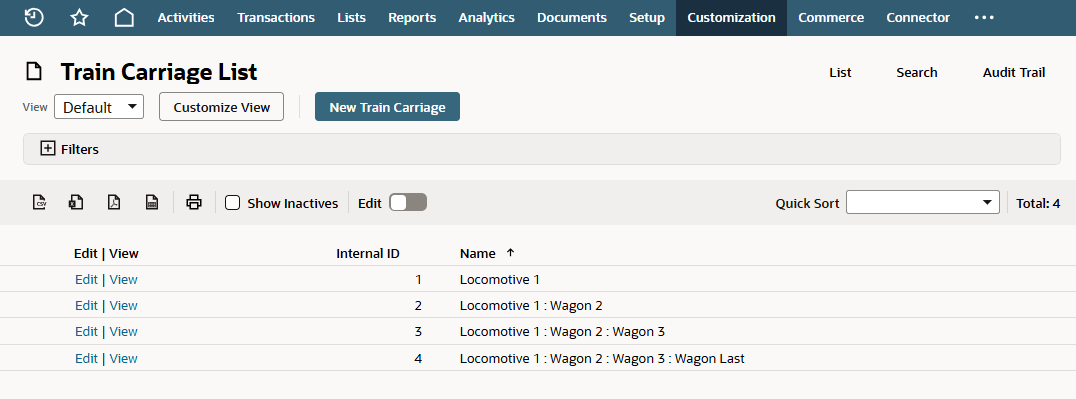
Next, complete the steps described in Creating the Custom Field for Steps in Creating Hierarchical Custom Records.