Enhanced Validations and Defaulting Process Flow
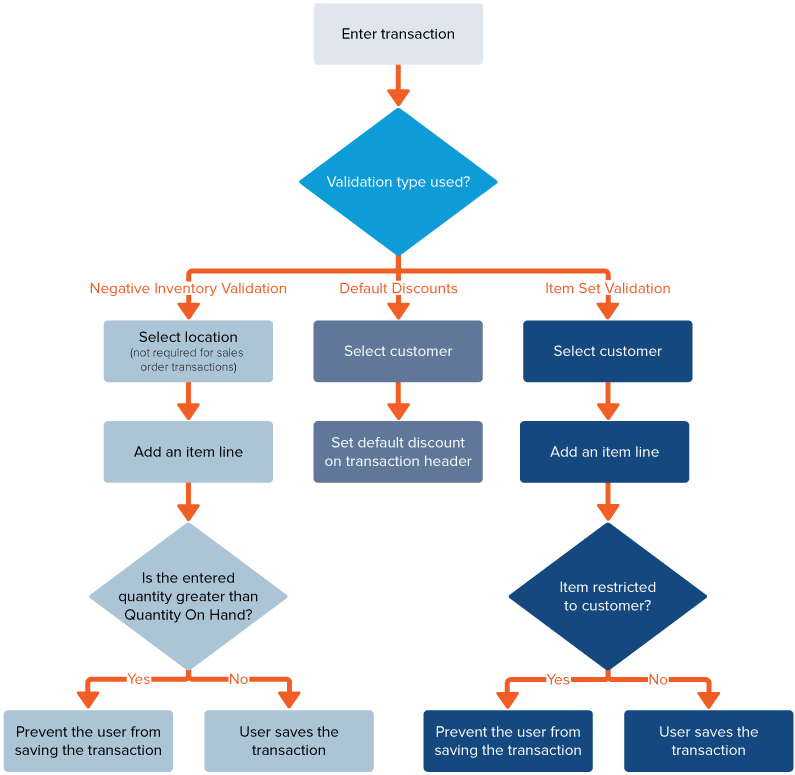
The diagram shows the process flow for the different key feature validations of Enhanced Validations and Defaulting SuiteApp.
Negative Inventory Validation validates the inventory in the selected location for the added line-item. If the item quantity entered is more than the on-hand stock in the selected location, the SuiteApp displays a message that warns you of the negative inventory for the item. If the Prevent Negative Inventory preference is enabled, you can't save the transaction. Otherwise, you can save the record. For more information, see Negative Inventory Validation.
In accounts where the Multi-Location Inventory feature is enabled, the SuiteApp validates the inventory in the locations specified on the transaction. For more information, see Multi-Location Inventory.
Default Discounts automatically applies the header level discount that you set for a customer or customer group. Discounts are applied on transactions based on the discount level available for the customer or customer group. For more information about the application of discounts, see Default Discounts Scenarios.
In Item Set Validation, items that are restricted for a customer group can't be added as line-item. The SuiteApp validates the item restrictions for the selected customer and prevents saving of transactions.
For more information, see Enabling Validations on Transactions.
Related Topics
-
Enhanced Validations and Defaulting Overview
- Installing the Enhanced Validations and Defaulting SuiteApp
- Setting Up Enhanced Validations and Defaulting
- Enabling Validations on Transactions
- CSV Imports for Enhanced Validations and Defaulting